Keeping AI Porn Chat Off a Shared Device
A shared laptop is not one device, it is several, and most people treat only the screen as the boundary. Discretion on a household machine comes from three layers instead: an account that belongs to you alone, habits that stop a session leaving traces behind, and a clear idea of what a browser's private mode does and does not do. The account is the only layer that protects anything by itself.
Key takeaways
- Use a separate operating-system profile, so browser history, downloads and sign-ins do not mix with anyone else's.
- Private browsing reduces local traces such as history and cookies; it is not a claim about anonymity, and the client's wording stays modest at a private and secure environment.
- Turn off notification previews and clipboard sharing across devices before your first session, not after.
- Sign out at the end of a session on any machine you do not own.
Why a shared device is a different problem
On a device used by one person, discretion is mostly about not being interrupted. On a shared machine the question changes: what evidence does the session leave, who could read it, and for how long does it survive. Those three questions are decided by the operating system and the browser far more than by the platform you are visiting.
Account separation is the strongest single measure and the least used. A second user profile on the same computer keeps its own browser history, its own saved passwords, its own download folder and its own recent-files list. Without it, every measure you take is a cleanup job inside someone else's space.
After that, the details are cumulative rather than decisive. Individually they are small; together they decide whether a session leaves a visible trail on a device that is not exclusively yours.
The three layers in practice
The first layer is the account. Separate profile, its own screen lock, and a lock that re-engages after a short idle period so an unfinished session does not sit open on a kitchen table. If the device supports a work profile or container, a second space for private use keeps the two worlds from sharing a clipboard.
The second layer is the session. Open a private window, do the work, close it. Check what the browser is set to sync, because history syncing is what turns a local session into a single account list available on every signed-in device. Autofill and password managers are convenient and also record which sites you visit, so decide deliberately whether that record is one you want.
The third layer is everything that talks. Notification previews, recent-app thumbnails, screenshot folders and clipboard history all reproduce a session somewhere it was not expected. Turning previews off takes fifteen seconds and removes the most common accidental disclosure, which is a banner appearing while the device sits on the sofa.
| Layer | What it protects | What it does not cover |
|---|---|---|
| Separate operating-system profile | Browser history, downloads, saved passwords, recent files | Anyone who knows the profile's lock code |
| Private browsing window | Local history and cookies after the window closes | Network-level records and synced account history |
| Notification settings | Preview banners and lock-screen summaries | Anything already visible on an unlocked screen |
| Clipboard discipline | Text surviving between apps and paired devices | Manual copying during the session itself |
| Signing out | Access by the next person to open the app | An account whose credentials are stored in the browser |
Read the third column carefully. Most household surprises are not breaches; they are ordinary conveniences such as a synced history or a stored password doing exactly what they were configured to do. Knowing which conveniences are active is most of the work.
Using the content-removal and complaints routes correctly
Discretion has a second half that is not about hiding anything: knowing how to get something removed or reported. The platform publishes a content removal policy with a reporting route on each content page as well as a support address, and a complaints policy that describes the escalation path. A reader who knows those exist spends less energy worrying about edge cases. The compliance statement page, for its part, states that the content is AI-generated text and depicts no real person.
That combination is worth weighing when comparing platforms. A site with a published removal route and a compliance statement is easier to reason about than one that leaves you guessing, and none of it depends on exaggerating what privacy settings can achieve. The platform also labels the format a Porn Chat AI and notes that some limitations apply under its content and community guidelines, which is the paragraph to read before assuming that unfiltered means unrestricted. Practical write-ups on habits and setup live in the AI chat blog.
Worked example: what the counters say about your own shortlist
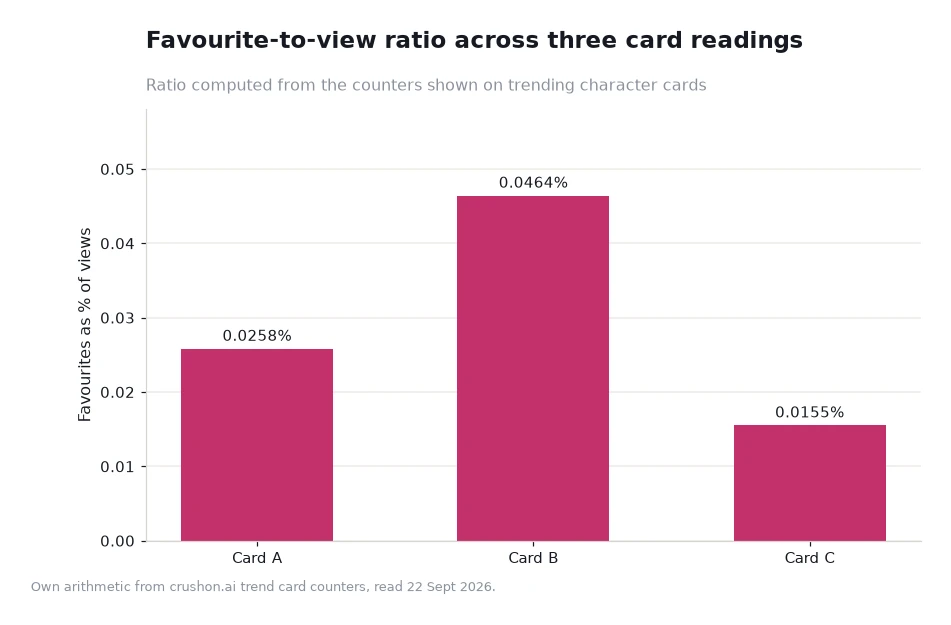
Discretion is partly a matter of not accumulating clutter, and the trend cards give a rough way to measure clutter. Favourites as a share of views comes in at 0.0258% on one card reading, 0.0464% on a second and 0.0155% on a third. The arithmetic is straightforward: at 0.0464%, 25 favourites imply about 53,879 views, since 25 divided by 0.000464 is 53,879. At 0.0155% the same 25 favourites imply about 161,290 views, because 25 divided by 0.000155 is 161,290.
Now apply the same discipline to your own habits as an illustrative assumption rather than platform data. Four sessions a week across twelve weeks is 48 sessions. If each session leaves three local traces - a history row, an autofill entry, a download - then the quarter's clutter is 144 items, which is why a separate profile beats retrospective cleanup: nothing has to be found and removed later.
A short checklist before the first session
Set the profile, set the lock, turn off previews, decide about sync, and know where the report and removal routes live. Then check the settings once more a week later, because an operating-system update can quietly restore a preview setting you switched off.
If a device is shared and you would rather not keep any thread there at all, the cleanest habit is the simplest one: treat the browser window as temporary, sign out when you finish, and open any adult AI chat session, including ai porn chat, only in an environment you control. The platform's part is a private and secure environment with state-of-the-art encryption; the device's part is yours to configure, and this page's compliance statement is a useful thing to read while you do it.
Readers who want the platform's own description of its content and privacy stance can start at the 2257 compliance statement and the removal policy, both linked from the site footer. Everything else on this list is a setting, and settings are only as good as the day you last checked them.
Frequently asked questions
Does private browsing make me anonymous?
No, and no browser claims that. A private window limits local traces such as history and cookies; it is not a statement about anonymity, and the platform's own wording is a private and secure environment.
Is a separate device better than a separate profile?
A separate device removes the shared-hardware problem entirely, but a second operating-system profile on the same machine covers the same local traces at no cost.
What should be switched off first?
Notification previews. They are the most common way a session becomes visible to someone who was not looking for it, and disabling them takes seconds.
Set it up once, then stop thinking about it
Ten minutes of configuration removes most of the ongoing work: profile, lock, previews, sync choice, and a note of where the removal and complaint routes sit. Revisit the settings when the operating system updates, and keep sessions in the environment you built rather than in whatever window happens to be open.
Sources: the card counters behind the 0.0258%, 0.0464% and 0.0155% ratios were read on 22 Sept 2026 from Crushon, and the twelve-week trace count is an illustrative assumption rather than platform data. Privacy wording follows the client's own phrasing.[1] Written for adults aged 18 and above.